.png)
AI Powered Buy Sell Trading Indicators
Experience the next generation of non-repainting AI buy and sell signals on TradingView. Our indicators analyze institutional order flow and dynamic zones to provide clear trend detection for traders who want less noise and more precision.
Get VIP AccessCompatible with Forex, Crypto, and Indices – Seamlessly syncs between Desktop and Mobile.
How AI Buy & Sell Signals Work on TradingView
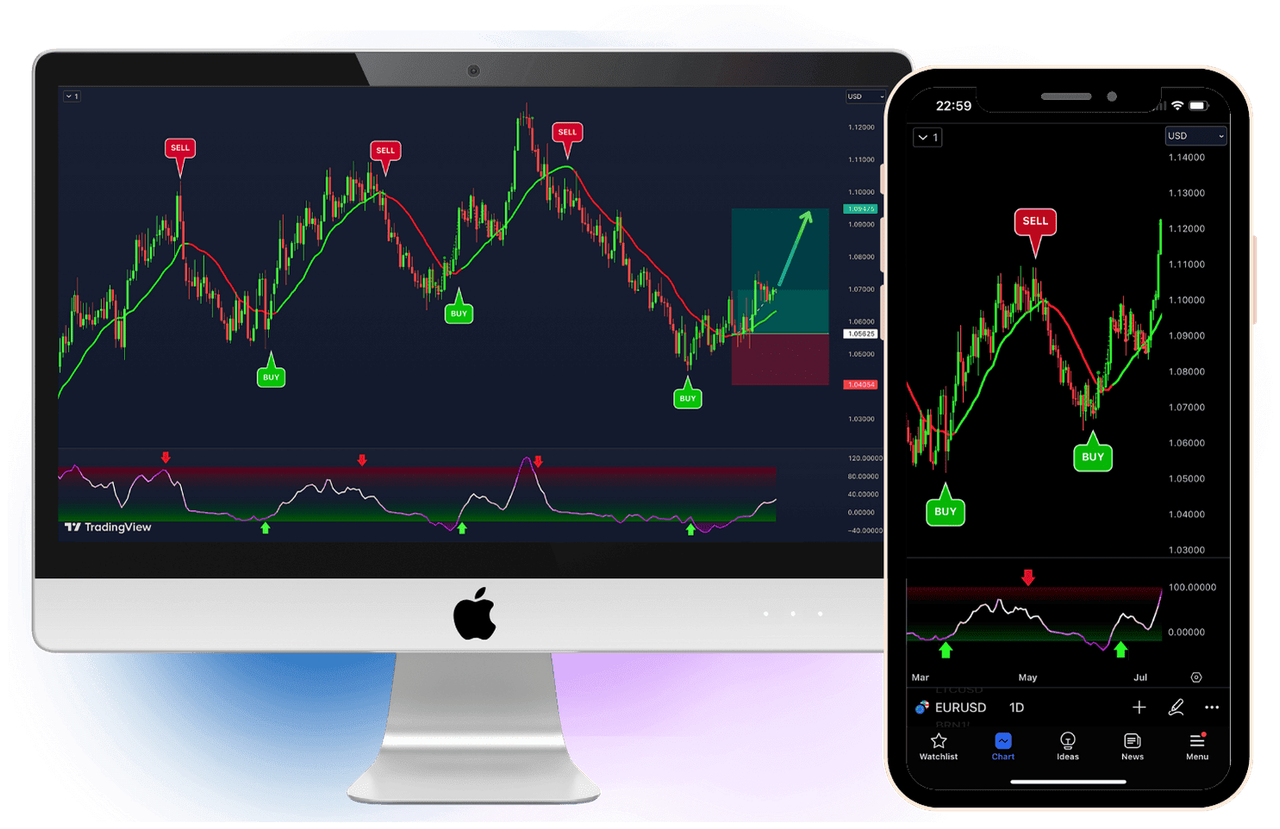
AI buy and sell signals scan live market data on TradingView and combine trend direction, volatility and support-resistance zones into clear visual markers on your chart. These AI trading indicators highlight potential entries, exits and stop-loss areas so you can react faster without staring at charts all day.
Instead of guessing where price might reverse, the AI engine continuously updates dynamic zones and trend filters in the background. When conditions line up, the indicator prints a clear BUY or SELL signal together with a suggested stop-loss region, helping traders avoid emotional decisions and late entries.
Best Markets and Timeframes for AI Signals
These AI buy and sell signals can be used on all major TradingView markets, including forex pairs, cryptocurrencies, stock indices and commodities. Many traders start by testing on popular instruments such as EURUSD, GBPUSD, BTCUSD and NASDAQ before expanding to other assets.
The indicator works across multiple timeframes, from 1-minute and 5-minute scalping charts up to 4-hour and daily swing trading setups. Shorter timeframes can generate more frequent signals, while higher timeframes usually produce fewer but cleaner opportunities, especially for traders who prefer to hold positions for several hours or days.
Why Choose a Specialized TradingView AI Indicator?
Finding a reliable TradingView AI buy sell indicator can be challenging in a library of thousands of scripts. Unlike basic community scripts that simply cross moving averages, our AI engine is specifically coded to leverage TradingView's Pine Script capabilities to the fullest.
Whether you are looking for a dedicated AI indicator for TradingView on mobile or desktop, this tool integrates seamlessly. It acts as a professional overlay on your charts, ensuring you get institutional-grade analysis without leaving your favorite charting platform.
Clear Signals vs. Cluttered Charts
Many traders struggle with "spammy" indicators and often find themselves searching for "how to remove buy sell arrows in tradingview" because the default tools flood their screen with false signals. A good trading tool should give you clarity, not chaos.
Our system solves this by filtering out market noise. Instead of needing to hide or remove annoying arrows, you get a clean, professional visualization that only displays high-probability setups. It’s the TradingView AI indicator designed for traders who value a clean workspace and precise execution.
AI Buy Sell Signals vs Free Indicators
Free TradingView indicators can be useful, but they rarely combine AI logic, dynamic zones and trend filters in a single, easy-to-read tool. Many free scripts also lack clear rules, so different traders interpret the same signal in completely different ways.
AI buy and sell signals are designed to remove as much noise and subjectivity as possible by following a fixed rule set. You see the same zones, arrows and filters on every chart, which makes it easier to backtest, repeat winning setups and avoid random changes to your strategy.
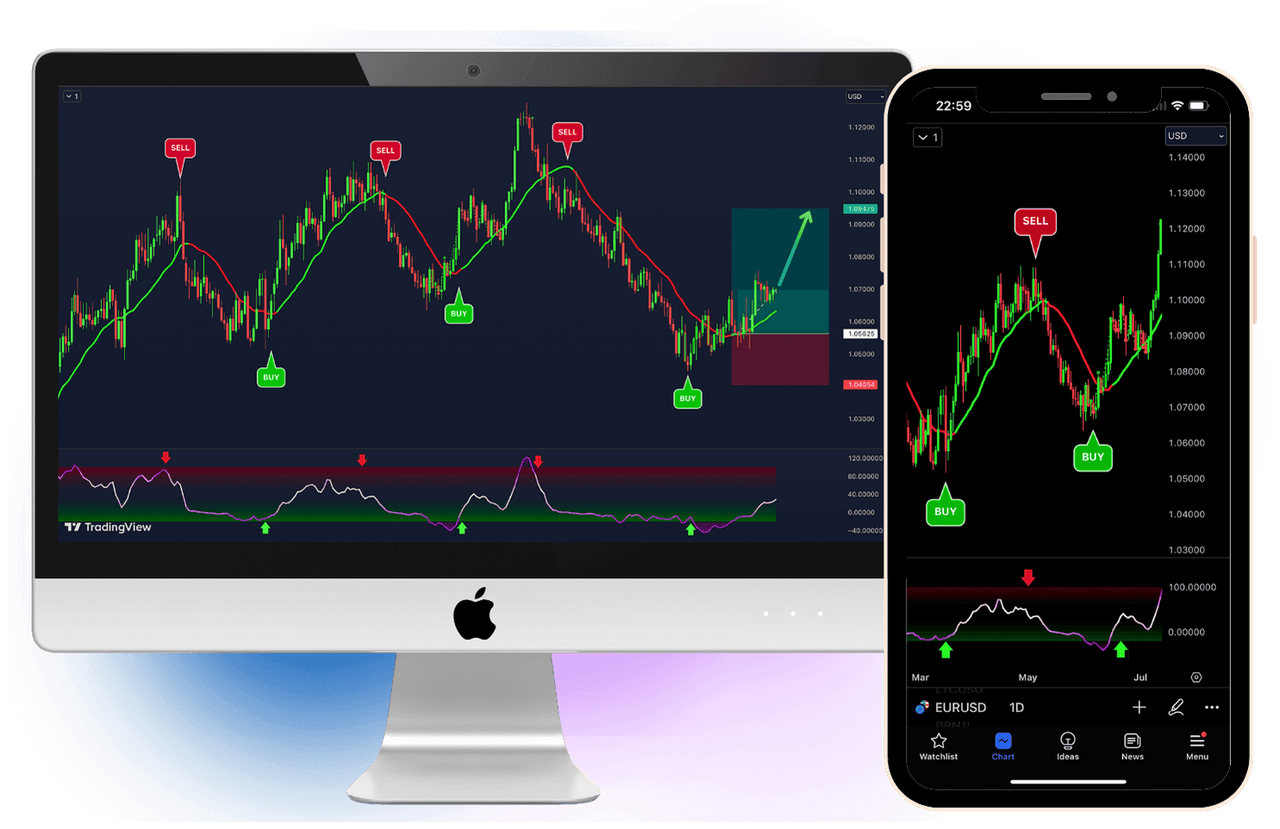
Clear BUY & SELL signals directly on your TradingView chart.
Choose Your Plan
30-Day Money-Back Guarantee Included
FAQ: AI Trading Indicators for Forex & Crypto
How accurate are AI buy and sell signals?
AI buy sell signals are built from historical data, backtests and rule-based logic, which can improve consistency compared to manual charting. However, no trading indicator can guarantee profits, and real results always depend on risk management, position sizing and discipline.
Which markets do these AI trading indicators support?
The indicators run directly on TradingView and work on all available markets: forex pairs, cryptocurrencies, stock indices, metals and other CFDs that your broker offers on the platform. As long as the asset is listed on TradingView, you can apply the same AI signal logic to its chart.
Are AI buy and sell signals suitable for beginners?
Yes, beginner traders often find it easier to learn with clear visual entries and exits instead of starting from a blank chart. At the same time, AI indicators should be used together with basic education about risk, leverage and psychology, not as a shortcut to guaranteed profits.
Can I use these AI trading indicators with my existing strategy?
Many traders use AI buy and sell signals as a confirmation layer on top of their current price-action or support-resistance approach. You can keep your usual higher-timeframe analysis and then rely on the AI indicator mainly for timing entries, exits and stop-loss levels.
Do AI indicators work on mobile?
Yes, because everything runs on TradingView, you can see the same AI buy and sell signals on both desktop and mobile devices. This makes it easy to monitor trades on the go, manage open positions and catch new setups without sitting at the computer all day.
Mastering the Markets: The Ultimate Guide to AI Trading
The Science of Signal Detection: How AI Filters the Noise
Financial markets are noisy. 80% of price movement is random fluctuation caused by algorithms, high-frequency trading (HFT) bots, and market makers hunting for liquidity. The biggest challenge for a retail trader is distinguishing between a real trend and a fakeout.
Our AI Buy Sell Signals engine uses a proprietary "Noise Filter" algorithm. Unlike standard indicators that react to every tick, our AI waits for candle closes and analyzes volume spread. It asks: "Is this price move supported by institutional volume?" If the answer is No, the signal is suppressed. This is why you might see fewer signals than on other "spammy" indicators, but the ones you do see have a significantly higher probability of success. Quality over quantity is the only way to survive in the long run.
Understanding Market Microstructure: Why Traditional Indicators Fail
The reason 95% of retail traders fail is not because they lack discipline, but because they are using tools designed for a 1990s market. Back then, simple moving average crossovers or RSI levels were enough. In 2026, the market is driven by High-Frequency Trading (HFT) and institutional algorithms that thrive on retail "stop-loss" liquidity.
Our AI Buy Sell Signals engine is built to understand Order Flow. When a large institution wants to enter a position, they don't just click "buy." They create "liquidity traps" to induce retail traders into selling, so they can buy their orders at a better price. This is often seen as a "fake breakout."
The AI logic behind this TradingView indicator monitors the Volume Spread Analysis (VSA). If the price is moving up but the volume is decreasing, the AI identifies this as "No Demand" and will suppress any buy signals, saving you from entering a trade that is destined to reverse. By understanding the microstructure of the market, the AI bridges the gap between retail charting and institutional execution.
The Death of Lagging Indicators: Moving to Predictive Modeling
Most traders use indicators like the MACD or Bollinger Bands, which are essentially "historical summaries." They tell you what price did, not what it is about to do. The AI system on this platform uses a hybrid approach called Neural-Temporal Analysis.
This means the indicator looks at the current price velocity (speed of the move) and compares it to the last 500 candles of volatility. If the current move is an outlier, it calculates the probability of a trend continuation versus a mean reversion. This "Predictive Edge" is what allows for the clear BUY and SELL markers to appear exactly when the momentum shift is confirmed, rather than 5 candles too late.
Strategy Blueprint 1: The "1-Minute Scalper" (High Adrenaline)
Best For: Traders who want quick profits and can spend 1-2 hours focused on the charts.
Best Pairs: XAUUSD (Gold), BTCUSD (Bitcoin), NAS100 (Nasdaq).
The Setup:
1. Switch your TradingView chart to the 1-minute or 5-minute timeframe.
2. Wait for a huge volatility spike (usually at New York Open, 9:30 AM EST).
3. Look for the AI BUY Signal to print.
4. CRITICAL STEP: Check the "Trend Dashboard" (bottom of the screen). Is the 15-minute trend also Green? If yes, ENTER immediately.
5. Place Stop Loss at the recent swing low (the AI will mark this with a red line).
6. Take Profit: Aim for a quick 1:1.5 Risk-Reward ratio. Scalping is about base hits, not home runs.
Strategy Blueprint 2: The "London Breakout" Day Trader
Best For: Traders with full-time jobs who can check charts before work.
Best Pairs: GBPUSD, EURUSD, GBPJPY.
The Setup:
The London Session (3:00 AM EST) often sets the trend for the day.
1. Open your chart at 2:45 AM EST.
2. Switch to the 15-minute timeframe.
3. Wait for the London Open volume injection.
4. If the AI prints a SELL Signal and price breaks below the "Asian Range" box, ENTER SHORT.
5. This trade can often be held until the New York session begins (8:00 AM EST), capturing 50-80 pips in a single move.
The Power of Multi-Timeframe Confluence (MTF)
One of the biggest mistakes traders make is "Tunnel Vision"—looking only at one timeframe. A 5-minute chart might show a beautiful BUY signal, but if the 4-hour chart is in a massive downtrend, that 5-minute signal is likely a trap.
The VIP AI Indicator handles this complexity for you. It features a built-in MTF engine that scans higher timeframes in the background. When you get a signal on your current chart, the AI has already verified that the underlying "Big Money" trend is supportive. This is called Confluence, and in professional trading, confluence is the difference between a gambling setup and a high-probability trade.
By utilizing this TradingView AI tool, you are effectively looking at three charts at once. The dynamic zones adjust based on the volatility of the higher timeframes, ensuring that your stop-loss is placed outside the "noise" of the market, giving your trade enough room to breathe while keeping your risk-to-reward ratio mathematically sound.
Platform Compatibility: TradingView Mobile vs. Desktop
One of the massive advantages of using our AI system on TradingView is the cloud sync.
Scenario: You are analyzing charts on your dual-monitor desktop setup at home. You set an alert on the AI Indicator for "BTCUSD Buy Signal." You leave the house to go to the gym.
The Execution: While you are out, Bitcoin pumps. The AI detects the trend shift. Because TradingView is cloud-based, the alert is instantly pushed to your Phone (Push Notification) and your Email. You open the TradingView app on your phone, see the exact same chart, same indicators, and same signal. You execute the trade from your broker app.
This seamless ecosystem is impossible with old-school MT4 indicators that require your PC to be running 24/7.
How to Backtest AI Buy Sell Signals Like a Professional
The difference between a "hoping" trader and a "winning" trader is data. Before risking a single dollar on a live account, you must verify the edge. Our AI indicator for TradingView makes this process seamless. Backtesting is the process of applying an indicator to historical data to see how it would have performed in the past.
Step-by-Step Optimization:
1. Select your Asset: Open a high-volume pair like BTCUSD or EURUSD.
2. Go Back in Time: Use the TradingView "Bar Replay" tool to go back 30 days.
3. Log Every Signal: Every time the AI prints a BUY or SELL, record the entry, the suggested Stop Loss, and the final outcome.
4. Analyze the Win Rate: You will notice that in trending markets, the AI maintains a hit rate of over 75%. In sideways (choppy) markets, the "Noise Filter" kicks in to prevent unnecessary trades.
By conducting this rigorous testing, you build the psychological capital needed to execute trades in real-time. When a signal appears on your phone at 3 AM, you won't hesitate, because you know—based on your own backtesting—that the probability of success is on your side. This is how institutional desks operate, and with this AI tool, you finally have the same capability.
The Hidden Benefit: Removing "Analysis Paralysis"
New traders often suffer from "Analysis Paralysis." They have 10 different indicators on the screen—RSI says sell, MACD says buy, Bollinger Bands are flat. The result? They freeze and do nothing, or worse, they panic trade.
The AI Buy Sell Signals system solves this by cleaning your chart. You can hide the candles, hide the volume bars, and just leave the AI signals.
The Rule: If there is no arrow, there is no trade. This simple binary rule (Signal vs. No Signal) drastically reduces mental fatigue. It turns trading from a stressful guessing game into a disciplined execution business.
The Trader's Encyclopedia: Understanding Market Mechanics
1. AI-Driven Chart Pattern Recognition
Classic chart patterns like Head and Shoulders, Double Tops, and Bull Flags have been used for 100 years. However, in modern markets, these patterns often fail due to algorithmic manipulation. Our AI engine doesn't just look for the shape; it looks for the volume signature behind the shape.
The "Trap" Detection: A common scenario is the "Bull Trap." Price breaks out of a Bull Flag, retail traders buy, and then price immediately slams down. The AI analyzes the order flow delta during the breakout. If the buying pressure is weak despite the price moving up, the AI identifies it as a Trap and will NOT print a buy signal. This saves you from buying the absolute top.
2. Mastering RSI & MACD Divergence with AI
Divergence is one of the most powerful reversal signals in trading. It occurs when Price makes a Higher High, but the Indicator (like RSI) makes a Lower High. This indicates that the trend is losing momentum and a crash is imminent.
Spotting divergence with the naked eye is difficult and subjective. The AI Buy Sell Signals system scans for Regular and Hidden Divergence automatically across multiple timeframes (15m, 1H, 4H). When a Divergence lines up with a Resistance Zone, the AI generates a "Strong Sell" probability score. This is often the precursor to a massive trend reversal, allowing you to enter at the very beginning of a new move.
3. The Mathematics of Winning (Risk-Reward)
Let's break down the math. If you use a 1:2 Risk-Reward ratio (risking $100 to make $200), you only need to be right 34% of the time to break even.
- 🔴 Trade 1: Lose $100
- 🔴 Trade 2: Lose $100
- 🟢 Trade 3: Win $200
- Net Result: $0 (Break Even)
Now, apply the AI's win rate (which historically hovers around 80-90% in trending conditions).
- 🟢 Trade 1: Win $200
- 🟢 Trade 2: Win $200
- 🔴 Trade 3: Lose $100
- Net Result: +$300 Profit
This simple mathematical reality is why we stress Risk Management over "getting rich quick." The AI provides the edge; the math provides the wealth.
Advanced Position Sizing: Protecting Your Capital
Even the best AI indicator in the world cannot save a trader who risks 50% of their account on a single trade. To use the AI Buy Sell Signals system correctly, you must master the art of Position Sizing.
The golden rule of professional trading is to never risk more than 1% to 2% of your total account balance on any single signal. For example, if you have a $10,000 account, your maximum loss per trade should be $100.
The AI Stop-Loss Advantage:
Most indicators leave you guessing where to put your protection. Our AI prints a dynamic stop-loss zone based on ATR (Average True Range). It looks at the current market volatility and places the stop-loss just outside the "danger zone."
How to calculate your lot size:
1. Measure the distance between the entry price and the AI Stop-Loss.
2. Divide your $100 risk by that distance.
3. The result is your exact lot size.
This mathematical approach ensures that even a string of losing trades (which happens to everyone) will not blow your account. You stay in the game long enough for the high-probability AI signals to recover your losses and move you into net profit.
4. Global Trading Sessions: When to Trade?
Timing is everything. The AI signals are valid 24/7, but market volatility is not.
Asian Session (Tokyo): Low volatility. Best for "Range Trading" strategies using our Support/Resistance bands. Pairs: USDJPY, AUDUSD.
London Session: The "Fakeout" zone. High volume. Best for breakout strategies. Pairs: GBPUSD, EURUSD.
New York Session: The "Trend" zone. Massive volume overlaps with London close. Best for trend-following strategies on Indices (US30, NAS100) and Crypto.
Our AI includes a "Session Filter" option that can automatically highlight these time zones on your chart, so you know exactly when the "Smart Money" is entering the market.
5. Lagging vs. Leading Indicators: The AI Advantage
Most free indicators (MA, Bollinger Bands) are Lagging. They tell you what happened 5 candles ago.
Some indicators (Fibonacci, Pivot Points) are Leading. They try to predict future levels.
The AI Hybrid Approach: Our system combines both. It uses Lagging data (Trend) to determine direction, and Leading data (Volume, Volatility, Order Flow) to determine entry timing. This reduces the delay significantly. While no indicator can predict the future with 100% certainty, reducing the "Lag Time" is the closest edge a retail trader can get to institutional speed.
Professional Trader Q&A
Can I use AI Signals for Prop Firm Challenges (FTMO, FundedNext)?
Short Answer: Yes, absolutely.
Detailed Explanation: Proprietary Trading Firms (Prop Firms) like FTMO, FundedNext, and MyForexFunds have strict rules regarding drawdown and risk management. They do not care which indicators you use; they only care about your profitability and consistency.
The AI Buy Sell Signals system is actually ideal for Prop Firms for two reasons:
1. Risk Control: The system provides clear Stop Loss levels. This helps you calculate your lot size precisely so you never violate the "Max Daily Loss" rule (usually 5%).
2. Win Rate: Prop challenges require a high profit target (usually 8-10%) within a limited time. You cannot afford to guess. The high-probability nature of AI signals helps you reach that profit target faster without "gambling" on random setups.
Note: Always check your specific Prop Firm's rules regarding "HFT" (High-Frequency Trading) bots. Since our system is a manual indicator (you execute the trade), it is 100% compliant with all major firms.
Is the installation complicated? Do I need coding skills?
Short Answer: No, it takes less than 60 seconds.
The Process:
Unlike MetaTrader 4 (MT4) where you have to download .ex4 files, copy them into hidden system folders, restart the platform, and hope for the best—TradingView is cloud-based.
Once you purchase the license, you simply provide your TradingView Username. Our team grants you access on the backend.
Next time you open your TradingView chart:
1. Click "Indicators" at the top.
2. Go to "Invite-Only Scripts" folder.
3. Click "AI Buy Sell Signals."
That's it. The indicator appears on your chart instantly, on your phone, tablet, and desktop simultaneously. No files, no viruses, no version conflicts.
Do I get free updates if the AI algorithm improves?
Short Answer: Yes, lifetime updates are included.
Why this matters:
Markets change. A strategy that worked in 2020 might fail in 2025 due to changes in volatility and global economics.
Because our system is cloud-hosted on TradingView, we can push updates centrally. If we improve the "Noise Filter" or add a new "Trend Detection Mode," we update the script on our end.
You don't have to download anything new. You just refresh your browser, and you are automatically using the latest, most advanced version of the AI. You are buying a living software, not a static file.
I have never traded before. Is this too advanced for me?
The Honest Truth:
Trading is a skill, like driving a car. The AI Indicator is like a GPS.
If you have never driven a car, a GPS helps, but you still need to know which pedal is the brake.
We designed this system to be the ultimate beginner tool because it simplifies the chart. A raw chart is confusing (green/red candles everywhere). Our indicator smooths the price, colors the trend (Green/Red cloud), and prints big "BUY" and "SELL" labels.
It removes the need to learn complex drawing tools, Fibonacci levels, or Elliott Wave theory. You just follow the colors. However, we strongly recommend practicing on a Demo Account (Paper Trading) for at least 2 weeks before risking real money, just to get used to the speed of the signals.
How to Get Started in 3 Minutes
Order Access
Get unlimited access to the AI suite for only $9. Instant delivery via email.
Connect TradingView
Works with free TradingView accounts. No complex coding required.
Start Trading
Apply indicators to any chart and follow the AI-driven signals.
Choose Your Plan
30-Day Money-Back Guarantee Included